

The best way to organize recipes is to get them all into one place, keep only the ones you'd actually make again, sort them into a handful of broad categories, and add a few tags for how you really search (like "weeknight" or "Grandma's"). That's it. Four moves, and you can start tonight.
Here's the thing nobody tells you: most recipe systems fail because they're too clever. Forty folders. Color codes. A binder with tabs you stopped updating in March. Meanwhile the lemon pasta you loved is buried in a screenshot from two years ago, next to a parking receipt.
We've been there. A phone full of saved TikToks and a drawer of our family's recipe cards. Bookmarks we swear we'll sort "someday." So we built a system simple enough to survive a busy week, and that's what we're sharing here.
You can't organize what you can't see. Before you sort anything, round it all up. Set a 30-minute timer and go hunting:
Don't judge anything yet. Just collect. If it helps, make a quick list of where everything lives so you know the size of the job.
This step is where organization actually happens. Go through your pile and ask one question about each recipe: would I really make this in the next year?
Keep it if:
Let it go if:
It's normal to cut half your pile. A smaller collection you trust beats a giant one you scroll past. The recipes you delete aren't lost forever, they're just not cluttering the ones you love.
Now sort what's left. The trick is to keep categories broad and boring. You want each recipe to have one obvious home, so you never stop and wonder where it goes.
A set that works for most kitchens:
Eight is plenty. If you're tempted to add "Chicken" or "Summer," hold that thought. Those are better as tags, which we'll get to next.
In Tradish, every recipe gets exactly one category from this same list, so the "where does this go?" question has one answer. Then you can group recipes into cookbooks, which are custom collections you name yourself, and a single recipe can live in more than one. Your chili can sit in "Soups" as its category and also in both a "Game Day" cookbook and a "Freezer Meals" cookbook. Tradish is launching on iOS and Android soon, so for now you can set this same structure up with folders or a notebook and carry it over later.
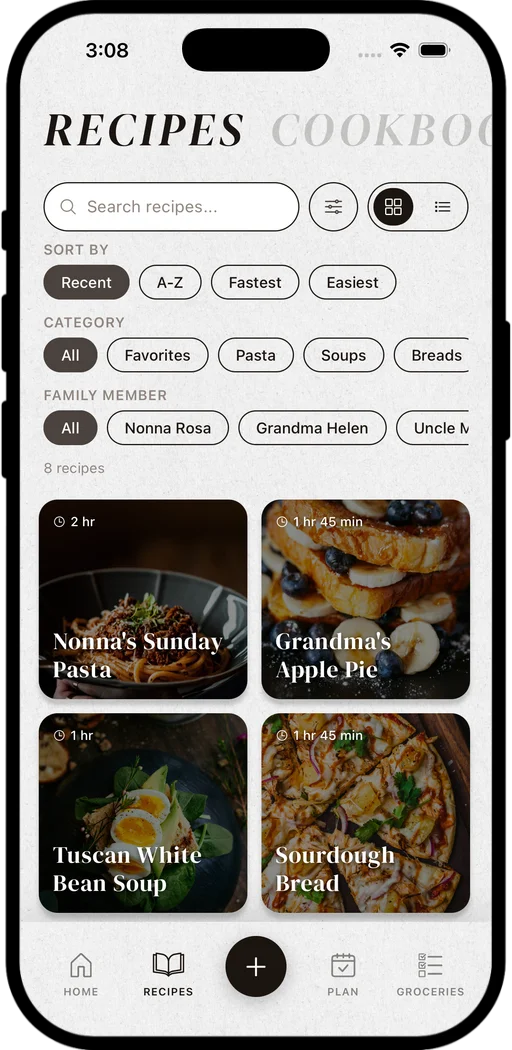
Your recipes, with search, sorting by Recent, A-Z, Fastest or Easiest, and filters for category and family member.
Categories tell you what a recipe is. Tags tell you when you'd reach for it. Think about the questions you ask yourself at 5 p.m.:
Keep your tag list short, maybe 10 to 15 total, and reuse the same words every time. "Weeknight" and "weeknights" and "quick dinner" will split one idea into three.
Two more habits that make a big difference:
In Tradish, tags are freeform, favorites are one tap, and every recipe has a "From" section where you can note the origin and even keep a photo of the original card. You can save recipes from links, social posts, scans, voice memos, or by writing them out, and they all end up in the same collection.

Tradish is launching on iOS and Android soon. It gives every recipe you own, from TikTok saves to Grandma's cards, one organized home with categories, cookbooks, tags, and favorites. Join the waitlist for early access and our best launch price.
Handwritten cards are the recipes most worth protecting and the easiest to lose. Don't let them sit in a separate system forever.
A simple approach:
Tradish can scan handwriting and printed text from your camera or photo library, and it can combine up to five photos into one recipe (handy for cards with notes on the back). Learn more about the recipe scanner, or read our full guide to digitizing handwritten recipes.
A recipe system doesn't stay organized on its own. New saves pile up fast. The fix is a tiny weekly habit, not a big annual purge.
Once a week (Sunday coffee is perfect):
That's it. Ten minutes, and your collection gets better every week instead of messier.
Keep everything in one place, use a small set of broad categories (like Mains, Sides, Desserts), and add a few tags for how you search, like "weeknight" or "make-ahead." Simple systems last longer than detailed ones because you'll actually keep using them.
Pick one app or one folder system and commit to it. Move in your screenshots, bookmarks, and saved social posts, give each recipe one category, and add tags. A recipe app makes this easier because you can search by ingredient or name instead of scrolling through files.
Most home cooks do well with about eight: Breakfast, Mains, Sides, Soups, Pasta, Breads, Desserts, and Drinks. Anything more specific, like a protein, a season, or an occasion, works better as a tag so each recipe still has one clear home.
Photograph or scan each card, type the recipe out so it's searchable, and keep the photo of the original next to the typed version. Then store the physical cards in a dry photo box. In Tradish, you'll be able to scan cards and keep the original photo in each recipe's "From" section.
There's no magic number, but most people cook from a core of 20 to 40 recipes. Keep the ones you'd honestly make in the next year, plus family recipes you want to preserve, and let the rest go.
Gather it, cut it down, sort it into a few categories, tag it the way you think, and spend ten minutes a week keeping it tidy. Do that, and the recipe you're craving will be there when you want it, not lost in your camera roll. And when you're ready for one home for every recipe, from social saves to Grandma's cards, we're building it.
Tradish is launching on iOS and Android soon. Join the waitlist to be first to know when we launch.
Related reading: